Your personal information is a valuable commodity — and it’s under constant attack. Data brokers, AI-driven advertisers, and cybercriminals are more sophisticated than ever.
The good news? You can fight back with a few consistent privacy habits.
Whether you’re on a laptop, phone, or smart home device, these 7 smart privacy habits will help you stay safe in the digital age.
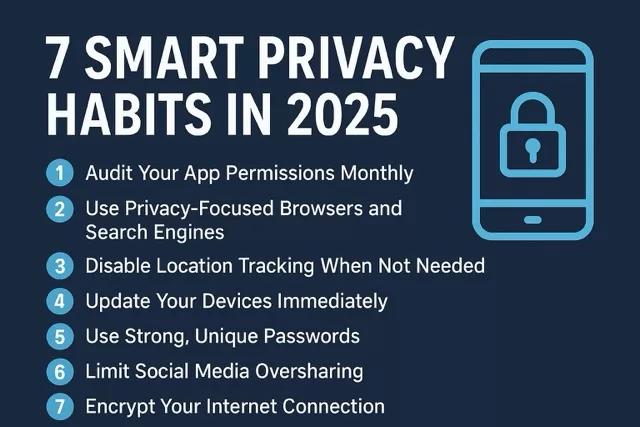
1. Audit Your App Permissions Monthly
- Why it matters: Apps often request permissions they don’t need — like access to your microphone or contacts.
- How to do it:
- iPhone: Settings → Privacy & Security → Review each category.
- Android: Settings → Privacy → Permission Manager.
- Pro Tip: If an app refuses to work without excessive permissions, consider deleting it.
2. Use Privacy-Focused Browsers and Search Engines
- Switch from Chrome to Brave, Firefox, or DuckDuckGo Browser for built-in tracker blocking.
- Use DuckDuckGo or Startpage to search without being profiled.
- Turn on “strict” tracking protection to block hidden scripts.
3. Disable Location Tracking When Not Needed
- Constant GPS tracking creates a detailed movement profile.
- On both iOS and Android, set most apps to “While Using” or “Never.”
- Delete your Google Location History and Apple Significant Locations.
4. Update Your Devices Immediately
- Security updates patch vulnerabilities before hackers exploit them.
- Enable automatic updates on your phone, laptop, and router.
- Check your IoT devices — smart TVs, thermostats, cameras — for firmware updates.
5. Use Strong, Unique Passwords
- Reuse = risk. If one site is breached, all your accounts are in danger.
- Use a password manager like Bitwarden or 1Password.
- Turn on two-factor authentication (2FA) wherever possible.
6. Limit Social Media Oversharing
- Avoid posting real-time location updates.
- Don’t share personal identifiers like your address, birthday, or travel plans.
- Review your privacy settings every few months.
7. Encrypt Your Internet Connection
- Use a reputable VPN to hide your IP address from advertisers and public Wi-Fi snoops.
- Look for no-logs policies and independent audits.
- Avoid free VPNs — they often sell your data.
SafeTechGuide
Digital privacy isn’t a one-time setup — it’s a lifestyle.
By adopting these 7 habits in 2025, you’ll:
- Reduce your online footprint.
- Make yourself a harder target for hackers.
- Take back control over your personal data.
✅ Next Step: Want to learn more about protecting yourself online? Check out our VPNs Explained post for practical strategies to safeguard your digital life.